Post-run analysis#
In the last tutorial, we simulated a Lennard-Jones crystal and stored data in the file 'LJ_T0.70.h5'.
In this tutorial, we will analyse this data. Below, we will do some standard imports and load the data from the file on the disk.
# Imports
import numpy as np
import matplotlib.pyplot as plt
import h5py
import gamdpy as gp

# Select h5 file
filename='./LJ_T0.70.h5'
output = gp.tools.TrajectoryIO(filename).get_h5()
Found .h5 file (./LJ_T0.70.h5), loading to gamdpy as output dictionary
Brief about the h5 data file#
Large data sets#
Large data sets, such as the trajectory of particle positions, are stored as an HDF5 dataset (a data structure similar to a NumPy array, but data is stored on the disk).
nblocks, nconfs, N, D = output['trajectory/positions'].shape
print(f'Number of timeblocks:          {nblocks = }')
print(f'Configurations per timeblock:  {nconfs = }')
print(f'Number of particles:           {N = }')
print(f'Number of spatial dimensions:  {D = }')
Number of timeblocks:          nblocks = 8
Configurations per timeblock:  nconfs = 12
Number of particles:           N = 2048
Number of spatial dimensions:  D = 3
Information in attributes#
Some information, such as details about the simulation box, is stored as attributes. Below, we fetch such data to get the density of the NVT simulation.
simbox = output['initial_configuration'].attrs['simbox_data']
volume = np.prod(simbox)
rho = N/volume
print(f'Density:  {rho = :.5f}')
Density: rho = 0.97300
Thermodynamics#
The gamdpy package contains helper functions to read data in .h5 files.
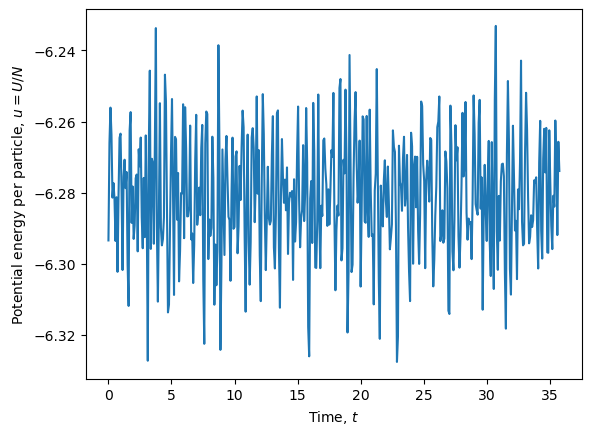
Thermodynamic data, stored in the 'scalar_saver' group, can be extracted using the gp.extract_scalars() function (we skip the first block with first_block=1 since the system is not equilibrated).
# Extract thermodynamic data
U, W, K = gp.ScalarSaver.extract(output, ['U', 'W', 'K'], per_particle=False, first_block=1)

# Get the associated times
times = gp.ScalarSaver.get_times(output, first_block=1)

# Plot potential energy per particle as a function of time
plt.figure()
plt.plot(times, U/N)
plt.xlabel(r'Time, $t$')
plt.ylabel('Potential energy per particle, $u=U/N$')
plt.show()
Some properties need to be computed from the data stored. Examples are the kinetic temperature and pressure (in LJ units).
# Compute instantaneous kinetic temperature
dof = D * N - D  # degrees of freedom
T_kin = 2 * K / dof

# Compute instantaneous pressure
P = rho * T_kin + W / volume

print(f'Mean kinetic temperature:  {np.mean(T_kin) = :.5f}')
print(f'Mean pressure:             {np.mean(P) = :.5f}')
Mean kinetic temperature:  np.mean(T_kin) = 0.70031
Mean pressure:             np.mean(P) = 1.40649
Structure#
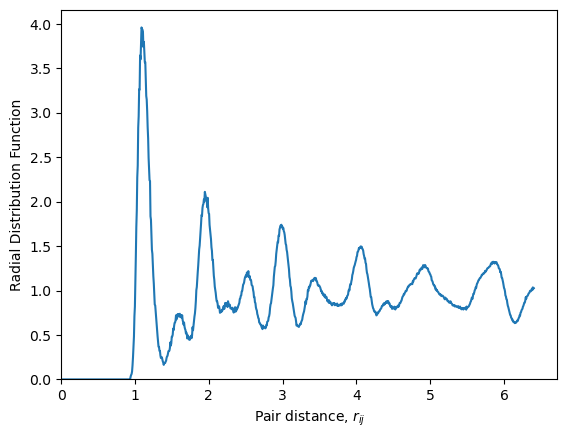
To investigate the structure and dynamics of particles, we need to analyse data in the 'trajectory_saver' group. Again, gamdpy has some built-in functionality to compute various measures. Let us calculate the radial distribution function. We will do this by inserting positions into a configuration object, and using the gamdpy.CalculatorRadialDistribution() class. The calculation is done on the GPU (for efficency).
# Create configuration object
configuration = gp.Configuration(D=D, N=N)
configuration.simbox = gp.Orthorhombic(D, output['initial_configuration'].attrs['simbox_data'])
configuration.ptype = output['initial_configuration/ptype']
configuration.copy_to_device()

# Make a radial distribution (RDF) calculator object
calc_rdf = gp.CalculatorRadialDistribution(configuration, bins=1000)

# Loop over the last (-1) configuration in each time block
positions = output['trajectory/positions']  # Shape: nblocks, nconfs, N, D
first_timeblock = 1
for pos in positions[first_timeblock:, -1, :, :]:
    configuration['r'] = pos
    configuration.copy_to_device()
    calc_rdf.update()
rdf_data = calc_rdf.read()

# Plot RDF
plt.figure()
plt.plot(rdf_data['distances'], rdf_data['rdf'][:,0,0])
plt.xlabel(r'Pair distance, $r_{ij}$')
plt.ylabel('Radial Distribution Function')
plt.xlim(0, None)
plt.ylim(0, None)
plt.savefig(filename+'_rdf.pdf')
plt.show()
Dynamics#
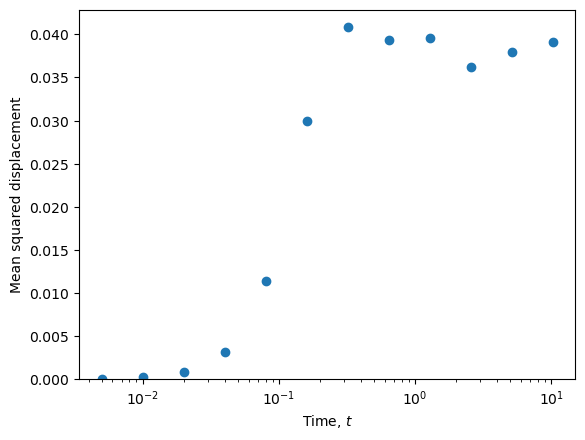
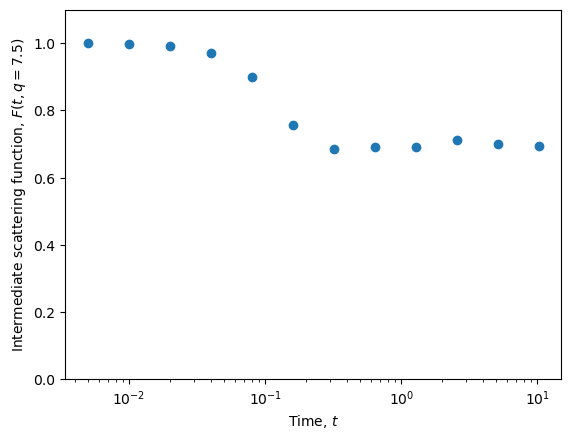
There are also built-in tools for analysing the trajectory. For example, the gamdpy.tools.calc_dynamics function computes several dynamical measures, including the mean squared displacement and the intermediate scattering function.
qvalues = 7.5
dynamics = gp.tools.calc_dynamics(output, first_block=1, qvalues=qvalues)  # Dictionary with dynamics
dynamics.keys()
dict_keys(['times', 'msd', 'alpha2', 'qvalues', 'Fs', 'count'])
plt.figure()
plt.plot(dynamics['times'], dynamics['msd'], 'o')
plt.xscale('log')
plt.ylim(0, None)
plt.xlabel(r'Time, $t$')
plt.ylabel(r'Mean squared displacement')
plt.show()
plt.figure()
plt.plot(dynamics['times'], dynamics['Fs'], 'o')
plt.xscale('log')
plt.ylim(0, 1.1)
plt.xlabel(r'Time, $t$')
plt.ylabel(r'Intermediate scattering function, $F(t, q = ' f'{qvalues}' r'$)')
plt.show()
Details about stored data#
Structure of h5 file#
Below is a function to print the structure of a given h5 file.
gp.tools.print_h5_structure(output)
initial_configuration/ (Group)
    ptype  (Dataset, shape=(2048,), dtype=int32)
    r_im  (Dataset, shape=(2048, 3), dtype=int32)
    scalars  (Dataset, shape=(2048, 4), dtype=float32)
    topology/ (Group)
        angles  (Dataset, shape=(0,), dtype=int32)
        bonds  (Dataset, shape=(0,), dtype=int32)
        dihedrals  (Dataset, shape=(0,), dtype=int32)
        molecules/ (Group)
    vectors  (Dataset, shape=(3, 2048, 3), dtype=float32)
restarts/ (Group)
    restart0000/ (Group)
        ptype  (Dataset, shape=(2048,), dtype=int32)
        r_im  (Dataset, shape=(2048, 3), dtype=int32)
        scalars  (Dataset, shape=(2048, 4), dtype=float32)
        topology/ (Group)
            angles  (Dataset, shape=(0,), dtype=int32)
            bonds  (Dataset, shape=(0,), dtype=int32)
            dihedrals  (Dataset, shape=(0,), dtype=int32)
            molecules/ (Group)
        vectors  (Dataset, shape=(3, 2048, 3), dtype=float32)
    restart0001/ (Group)
        ptype  (Dataset, shape=(2048,), dtype=int32)
        r_im  (Dataset, shape=(2048, 3), dtype=int32)
        scalars  (Dataset, shape=(2048, 4), dtype=float32)
        topology/ (Group)
            angles  (Dataset, shape=(0,), dtype=int32)
            bonds  (Dataset, shape=(0,), dtype=int32)
            dihedrals  (Dataset, shape=(0,), dtype=int32)
            molecules/ (Group)
        vectors  (Dataset, shape=(3, 2048, 3), dtype=float32)
    restart0002/ (Group)
        ptype  (Dataset, shape=(2048,), dtype=int32)
        r_im  (Dataset, shape=(2048, 3), dtype=int32)
        scalars  (Dataset, shape=(2048, 4), dtype=float32)
        topology/ (Group)
            angles  (Dataset, shape=(0,), dtype=int32)
            bonds  (Dataset, shape=(0,), dtype=int32)
            dihedrals  (Dataset, shape=(0,), dtype=int32)
            molecules/ (Group)
        vectors  (Dataset, shape=(3, 2048, 3), dtype=float32)
    restart0003/ (Group)
        ptype  (Dataset, shape=(2048,), dtype=int32)
        r_im  (Dataset, shape=(2048, 3), dtype=int32)
        scalars  (Dataset, shape=(2048, 4), dtype=float32)
        topology/ (Group)
            angles  (Dataset, shape=(0,), dtype=int32)
            bonds  (Dataset, shape=(0,), dtype=int32)
            dihedrals  (Dataset, shape=(0,), dtype=int32)
            molecules/ (Group)
        vectors  (Dataset, shape=(3, 2048, 3), dtype=float32)
    restart0004/ (Group)
        ptype  (Dataset, shape=(2048,), dtype=int32)
        r_im  (Dataset, shape=(2048, 3), dtype=int32)
        scalars  (Dataset, shape=(2048, 4), dtype=float32)
        topology/ (Group)
            angles  (Dataset, shape=(0,), dtype=int32)
            bonds  (Dataset, shape=(0,), dtype=int32)
            dihedrals  (Dataset, shape=(0,), dtype=int32)
            molecules/ (Group)
        vectors  (Dataset, shape=(3, 2048, 3), dtype=float32)
    restart0005/ (Group)
        ptype  (Dataset, shape=(2048,), dtype=int32)
        r_im  (Dataset, shape=(2048, 3), dtype=int32)
        scalars  (Dataset, shape=(2048, 4), dtype=float32)
        topology/ (Group)
            angles  (Dataset, shape=(0,), dtype=int32)
            bonds  (Dataset, shape=(0,), dtype=int32)
            dihedrals  (Dataset, shape=(0,), dtype=int32)
            molecules/ (Group)
        vectors  (Dataset, shape=(3, 2048, 3), dtype=float32)
    restart0006/ (Group)
        ptype  (Dataset, shape=(2048,), dtype=int32)
        r_im  (Dataset, shape=(2048, 3), dtype=int32)
        scalars  (Dataset, shape=(2048, 4), dtype=float32)
        topology/ (Group)
            angles  (Dataset, shape=(0,), dtype=int32)
            bonds  (Dataset, shape=(0,), dtype=int32)
            dihedrals  (Dataset, shape=(0,), dtype=int32)
            molecules/ (Group)
        vectors  (Dataset, shape=(3, 2048, 3), dtype=float32)
    restart0007/ (Group)
        ptype  (Dataset, shape=(2048,), dtype=int32)
        r_im  (Dataset, shape=(2048, 3), dtype=int32)
        scalars  (Dataset, shape=(2048, 4), dtype=float32)
        topology/ (Group)
            angles  (Dataset, shape=(0,), dtype=int32)
            bonds  (Dataset, shape=(0,), dtype=int32)
            dihedrals  (Dataset, shape=(0,), dtype=int32)
            molecules/ (Group)
        vectors  (Dataset, shape=(3, 2048, 3), dtype=float32)
scalars/ (Group)
    scalars  (Dataset, shape=(8, 64, 3), dtype=float32)
    steps  (Dataset, shape=(65,), dtype=int32)
trajectory/ (Group)
    images  (Dataset, shape=(8, 12, 2048, 3), dtype=int32)
    positions  (Dataset, shape=(8, 12, 2048, 3), dtype=float32)
    ptypes  (Dataset, shape=(8, 12, 2048), dtype=int32)
    steps  (Dataset, shape=(12,), dtype=int32)
    topologies/ (Group)
        block0000/ (Group)
            angles  (Dataset, shape=(0,), dtype=int32)
            bonds  (Dataset, shape=(0,), dtype=int32)
            dihedrals  (Dataset, shape=(0,), dtype=int32)
            molecules/ (Group)
        block0001/ (Group)
            angles  (Dataset, shape=(0,), dtype=int32)
            bonds  (Dataset, shape=(0,), dtype=int32)
            dihedrals  (Dataset, shape=(0,), dtype=int32)
            molecules/ (Group)
        block0002/ (Group)
            angles  (Dataset, shape=(0,), dtype=int32)
            bonds  (Dataset, shape=(0,), dtype=int32)
            dihedrals  (Dataset, shape=(0,), dtype=int32)
            molecules/ (Group)
        block0003/ (Group)
            angles  (Dataset, shape=(0,), dtype=int32)
            bonds  (Dataset, shape=(0,), dtype=int32)
            dihedrals  (Dataset, shape=(0,), dtype=int32)
            molecules/ (Group)
        block0004/ (Group)
            angles  (Dataset, shape=(0,), dtype=int32)
            bonds  (Dataset, shape=(0,), dtype=int32)
            dihedrals  (Dataset, shape=(0,), dtype=int32)
            molecules/ (Group)
        block0005/ (Group)
            angles  (Dataset, shape=(0,), dtype=int32)
            bonds  (Dataset, shape=(0,), dtype=int32)
            dihedrals  (Dataset, shape=(0,), dtype=int32)
            molecules/ (Group)
        block0006/ (Group)
            angles  (Dataset, shape=(0,), dtype=int32)
            bonds  (Dataset, shape=(0,), dtype=int32)
            dihedrals  (Dataset, shape=(0,), dtype=int32)
            molecules/ (Group)
        block0007/ (Group)
            angles  (Dataset, shape=(0,), dtype=int32)
            bonds  (Dataset, shape=(0,), dtype=int32)
            dihedrals  (Dataset, shape=(0,), dtype=int32)
            molecules/ (Group)
Attributes inside the H5 file#
Below is a function that will print the attributes in a given h5 file.
gp.tools.print_h5_attributes(output)
Attributes at /:
    - dt: 0.005
    - script_content: ...
    - script_name: ...
Attributes at /initial_configuration/:
    - simbox_data: [12.815602 12.815602 12.815602]
    - simbox_name: Orthorhombic
Attributes at /initial_configuration/scalars:
    - scalar_columns: ['U' 'W' 'K' 'm']
Attributes at /initial_configuration/topology/molecules/:
    - names: []
Attributes at /initial_configuration/vectors:
    - vector_columns: ['r' 'v' 'f']
Attributes at /restarts/:
    - timeblocks_between_restarts: 1
Attributes at /restarts/restart0000/:
    - simbox_data: [12.815602 12.815602 12.815602]
    - simbox_name: Orthorhombic
Attributes at /restarts/restart0000/scalars:
    - scalar_columns: ['U' 'W' 'K' 'm']
Attributes at /restarts/restart0000/topology/molecules/:
    - names: []
Attributes at /restarts/restart0000/vectors:
    - vector_columns: ['r' 'v' 'f']
Attributes at /restarts/restart0001/:
    - simbox_data: [12.815602 12.815602 12.815602]
    - simbox_name: Orthorhombic
Attributes at /restarts/restart0001/scalars:
    - scalar_columns: ['U' 'W' 'K' 'm']
Attributes at /restarts/restart0001/topology/molecules/:
    - names: []
Attributes at /restarts/restart0001/vectors:
    - vector_columns: ['r' 'v' 'f']
Attributes at /restarts/restart0002/:
    - simbox_data: [12.815602 12.815602 12.815602]
    - simbox_name: Orthorhombic
Attributes at /restarts/restart0002/scalars:
    - scalar_columns: ['U' 'W' 'K' 'm']
Attributes at /restarts/restart0002/topology/molecules/:
    - names: []
Attributes at /restarts/restart0002/vectors:
    - vector_columns: ['r' 'v' 'f']
Attributes at /restarts/restart0003/:
    - simbox_data: [12.815602 12.815602 12.815602]
    - simbox_name: Orthorhombic
Attributes at /restarts/restart0003/scalars:
    - scalar_columns: ['U' 'W' 'K' 'm']
Attributes at /restarts/restart0003/topology/molecules/:
    - names: []
Attributes at /restarts/restart0003/vectors:
    - vector_columns: ['r' 'v' 'f']
Attributes at /restarts/restart0004/:
    - simbox_data: [12.815602 12.815602 12.815602]
    - simbox_name: Orthorhombic
Attributes at /restarts/restart0004/scalars:
    - scalar_columns: ['U' 'W' 'K' 'm']
Attributes at /restarts/restart0004/topology/molecules/:
    - names: []
Attributes at /restarts/restart0004/vectors:
    - vector_columns: ['r' 'v' 'f']
Attributes at /restarts/restart0005/:
    - simbox_data: [12.815602 12.815602 12.815602]
    - simbox_name: Orthorhombic
Attributes at /restarts/restart0005/scalars:
    - scalar_columns: ['U' 'W' 'K' 'm']
Attributes at /restarts/restart0005/topology/molecules/:
    - names: []
Attributes at /restarts/restart0005/vectors:
    - vector_columns: ['r' 'v' 'f']
Attributes at /restarts/restart0006/:
    - simbox_data: [12.815602 12.815602 12.815602]
    - simbox_name: Orthorhombic
Attributes at /restarts/restart0006/scalars:
    - scalar_columns: ['U' 'W' 'K' 'm']
Attributes at /restarts/restart0006/topology/molecules/:
    - names: []
Attributes at /restarts/restart0006/vectors:
    - vector_columns: ['r' 'v' 'f']
Attributes at /restarts/restart0007/:
    - simbox_data: [12.815602 12.815602 12.815602]
    - simbox_name: Orthorhombic
Attributes at /restarts/restart0007/scalars:
    - scalar_columns: ['U' 'W' 'K' 'm']
Attributes at /restarts/restart0007/topology/molecules/:
    - names: []
Attributes at /restarts/restart0007/vectors:
    - vector_columns: ['r' 'v' 'f']
Attributes at /scalars/:
    - compression_info: gzip with opts 4
    - scalar_columns: ['U' 'W' 'K']
    - scheduler: Lin
    - scheduler_info: {"steps_between": 16, "npoints": null}
    - steps_between_output: 16
Attributes at /trajectory/:
    - compression_info: gzip with opts 4
    - num_timeblocks: 8
    - scheduler: Log2
    - scheduler_info: {}
    - steps_per_timeblock: 1024
    - trajectory_columns: ['r' 'img']
    - update_ptype: False
    - update_topology: False
Attributes at /trajectory/topologies/block0000/molecules/:
    - names: []
Attributes at /trajectory/topologies/block0001/molecules/:
    - names: []
Attributes at /trajectory/topologies/block0002/molecules/:
    - names: []
Attributes at /trajectory/topologies/block0003/molecules/:
    - names: []
Attributes at /trajectory/topologies/block0004/molecules/:
    - names: []
Attributes at /trajectory/topologies/block0005/molecules/:
    - names: []
Attributes at /trajectory/topologies/block0006/molecules/:
    - names: []
Attributes at /trajectory/topologies/block0007/molecules/:
    - names: []
Concluding remarks#
You have now conducted your first simulation and done some post-analysis of the trajectory. You now understand the basics of how gamdpy works, and are ready for more advanced simulations and analysis - see examples.